When working in Graphisoft Archicad, designers often rely on labels to annotate drawings clearly and consistently. Archicad includes a wide range of in built labels that can display properties, classifications, components, dimensions, levels, and many other forms of metadata. However, one important feature is missing. There is no native way to label the parameters of an object.
If you have ever tried to label an object parameter in Archicad, you will know the limitation immediately. You might have a custom object with key parameters, or you may be using a third party Archicad object that contains important information inside its parameter list. Yet Archicad does not provide a built in label that can display those parameters on your drawings.
This is where Archibites steps in.

A Simple Way to Label Any Object Parameter
Archibites Multi Label provides a powerful solution for users who need to label parameters directly from any Archicad object. Instead of being restricted to the default label categories provided by Graphisoft, you can now select a parameter by name and place it directly on your plan, section, elevation, or detail. The parameter can then be further formatted into any text or unit type required.
The label works with any object as long as you know the parameter name. You can use it on your own custom objects or on any third party Archicad library objects. This gives you total flexibility when documenting your model and ensures important information is visible exactly where you need it.
Even Better When Used With Archibites Objects
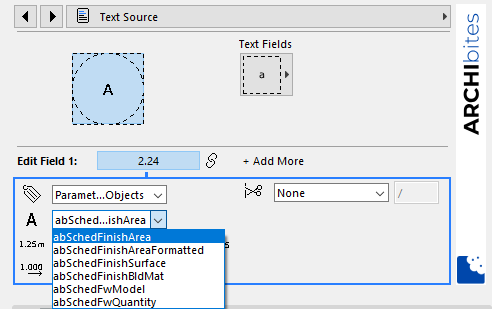
When you are labelling Archibites objects, the process becomes even easier. All parameters will automatically appear as selectable options in the label interface. You do not need to memorise parameter names or look inside the object settings. The label presents everything in a clear and user friendly list.
More Graphical Options Than the Standard Library Labels
Archibites Multi Label does more than simply expose parameters. It also includes all the graphical options available from the Archicad in built label library, plus many additional features. You have full control over formatting, alignment, automatic text behaviour, graphic style, and more. This allows you to match the look and feel of your existing documentation or enhance it with richer presentation tools.
You can explore the full list of features here: