Checking compliance of doors to Australian Standard Accessibility requirements is an essential part of quality control within Architectural practices. For projects in Australia, compliance with Australian Standards AS 1428.1 and AS 1428.2 is mandatory. While Graphisoft Archicad provides built in tools to manually enter values to represent door clearances, it does not offer a straightforward way to show fully compliant accessible door circulation areas. Australian Standards for Accessibility requirements change depending on the door width, the approach direction, whether the door is hinged or sliding, and wall thickness, which means the default settings in Archicad cannot automatically adapt to all situations.
As a result, many users may resort to saving dozens of favourites for every possible door configuration. If you are manually saving favourites for each accessible door type and each change in door clearance, you know how time consuming and unnecessary this process becomes. The built in door clearance settings are simply not designed for detailed Australian Standard compliance.
This is where Archibites can help.
Automate Door Clearance Calculations Instantly
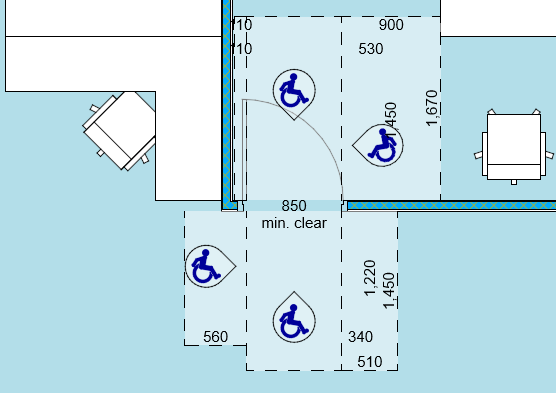
Archibites Door Circulation is an Archicad object label designed specifically to automate the display of accessible door clearances. Instead of relying on manually created favourites or multiple versions of doors, the label dynamically generates the correct Australian Standard clearance for each door.
The supported Australian Standards include:
- AS 1428.1
- AS 1428.2
These standards define the required space around a door, including latch side clearance, hinge side approach, and circulation width. By applying the Archibites Door Circulation label, you can show the correct clearances instantly without complex manual setup. It even alerts you if the door width clearance (from edge of hinged door to opposite jamb) is not compliant.
Works With Any Archicad or Cadimage/CI Tools Door
Archibites Door Circulation is a label, not a door object. This means you simply attach it to any door in your model, whether it is a standard Archicad door, a Graphisoft door, or a Cadimage door. Once placed, you select which standard you want to follow and choose your preferred graphical style. The label will automatically orient itself to the door and match the correct door width automatically.
No scripting. No favourites. No duplicated doors. It just works.
Easy Control of Approach Direction
One of the challenges in documenting accessible door circulation is controlling the approach direction. Left, right, push side, pull side, and different hinge arrangements all affect the required clearance zone.
With Archibites Door Circulation, you simply move the plan hotspots to set the approach direction. The label then updates its layout to match the correct Australian Standard requirement. This makes it incredibly fast to document multiple doors across large projects while maintaining full compliance.
Designed for Clear Communication and Documentation
Because it is a label, all graphic settings can be controlled directly through the label interface. You can adjust line types, colours, fill settings, annotation appearance, scale behaviour, and more. This allows you to match your office standards and ensure final drawings clearly communicate the required door circulation space.
Archibites Door Circulation is designed to save time, reduce errors, and help you produce clear and compliant documentation directly inside Archicad. You can see more here.