Retreive Keys
Note: the License Key is NOT the license Number found in Archicad –> Help –> Licence information’ or your Graphisoft ID username. See below for details.
1. Company Wide.
If all staff are linked to your Company Graphisoft profile then use METHOD 1. In almost all cases this is the easiest and recommended method for all license types.
The added benefit is once setup, any users you add or remove from your Graphisoft account will be automatically included or excluded without any additional updates from Archibites.
2. Individual users.
If your staff are separately registered, you provide User ID’s for each staff member. See METHOD 2.
Additional individual users will require Archibites to re-issue the library to you so using the company wide method is preferrable.
You can also use a combination of Method 1 and 2 depending on your office setup.
Input Keys
After using one of the METHODs below enter the keys and seats into the ArchiCAD License Key page on the Archibites My Accounts page
Use the Add buttons to add multiple licenses. All Keys/IDs and seats that use Archibites tools must be entered. Save changes.

Let us know
If you have recently made a purchase, we will wait for this information before issuing the tools to you.
If you would like us to update the license for existing purchases with new keys/IDs, please complete the above steps and let us know via the Support/Contact page.
METHOD 1: Organisation Unique ID via Graphisoft management website.
Open companymanagement.graphisoft.com
Go to Company Profile and retrieve the Company Unique ID.
The ID is a 64 character string (no less, no more), E.g. 1c1c1c1c1c1c1c1c1c1c1c1c1c1c1c1c1c1c1c1c1c1c1c1c1c1c1c1c1c1c1c1c
It is NOT located under Cloud License, Software Keys, Hardware Keys or your Graphisoft ID username.

Figure: Example of Company Unique ID
METHOD 2: User Unique ID via Graphisoft management website.
Open companymanagement.graphisoft.com
Go to Members and retrieve the User Unique ID.
If Members tab is empty, go to Company Profile tab and retrieve the Administrator Unique ID.
The ID is a 64 character string (no less, no more), E.g. 1c1c1c1c1c1c1c1c1c1c1c1c1c1c1c1c1c1c1c1c1c1c1c1c1c1c1c1c1c1c1c1c
It is NOT located under Cloud License, Software Keys, Hardware Keys or your Graphisoft ID username.
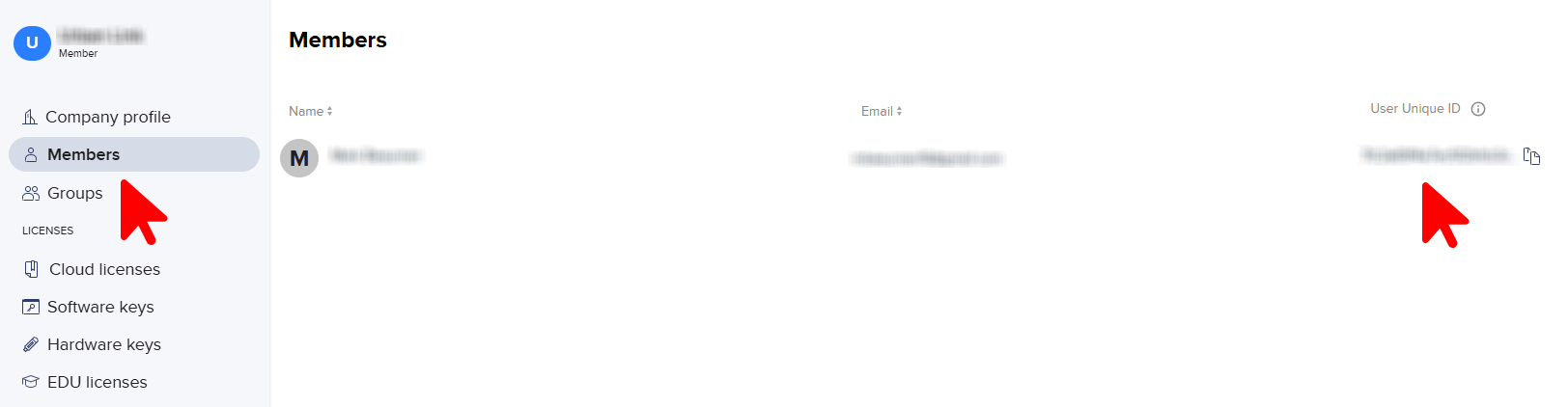
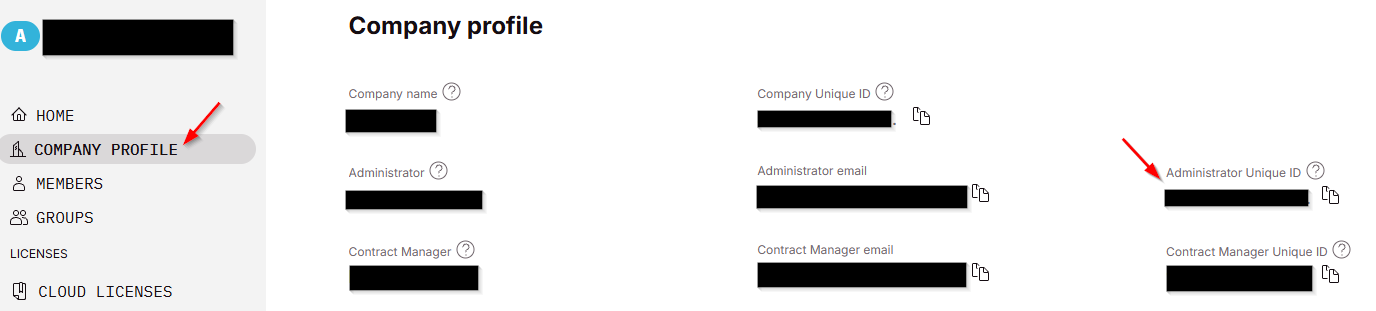
Figure: Example of User Unique ID
Troubleshooting
- Once you have entered your keys on Archibites My Account page please ensure you let us know so your license can be issued or updated with the keys. This will not happen automatically.
- The License Key is NOT the license Number found in Archicad –> Help –> Licence information’. Refer instructions above.
- The License Key is NOT your Graphisoft ID username. Refer instructions above.
- For METHOD 1 or 2, ensure users are logged into the correct Graphisoft id
- Ensure your Archicad is up to date with latest hotfix.
- Still not working? With Archicad open, Log out then Log back in to your Graphisoft ID.
- Ok, you have got to the end, contact us on the support page.
Don’t yet own Archibites objects?
You can download a free trial version or Archibites objects here.